

Fedora developers who like the Visual Studio Code layout but do not want Microsoft’s telemetry usually end up at VSCodium. The cleanest way to install VSCodium on Fedora is through the native RPM repository for most systems, while Flatpak fits desktops that already lean on sandboxed apps.
Fedora does not ship VSCodium in the default repositories, so you install it from the upstream RPM repository or from Flathub. The steps below cover both methods, the terminal launch commands, updates, removal, and the Fedora-specific problems most likely to block the install.
Install VSCodium on Fedora
Both supported installation paths work well on current Fedora releases, but they behave differently when you update or remove them. The RPM repository fits best when you want VSCodium managed with the rest of your DNF packages, while Flatpak makes more sense if you already keep desktop apps isolated.
| Method | Source | Update path | Best fit |
|---|---|---|---|
| RPM repository | VSCodium RPM repository | sudo dnf upgrade --refresh | Most Fedora systems that prefer native packages |
| Flatpak | Flathub | sudo flatpak update --system com.vscodium.codium | Desktop setups that want sandboxing |
Install only one build unless you have a specific reason to keep both. The RPM and Flatpak packages update separately, store their own settings, and make cleanup more confusing when they live on the same workstation.
Update Fedora before installing VSCodium
Start with a metadata refresh and a normal package upgrade so DNF does not trip over stale repository data during the install:
sudo dnf upgrade --refreshThis guide uses
sudofor system-wide package and Flatpak commands. If your account does not have sudo access yet, follow the guide on how to add a user to sudoers on Fedora.
On a fully updated Fedora system, DNF returns:
Nothing to do.
Install VSCodium from the RPM repository
The RPM repository gives you a native Fedora package that updates through the same DNF workflow you already use for the rest of the system.
sudo tee /etc/yum.repos.d/vscodium.repo > /dev/null << 'EOF'
[vscodium]
name=VSCodium
baseurl=https://paulcarroty.gitlab.io/vscodium-deb-rpm-repo/rpms/
enabled=1
gpgcheck=1
repo_gpgcheck=0
gpgkey=https://gitlab.com/paulcarroty/vscodium-deb-rpm-repo/raw/master/pub.gpg
metadata_expire=1h
EOF
Verify that Fedora can see the repository before you install the package:
dnf repo list --all | grep -i vscodiumYou should see the VSCodium repository in the enabled state:
vscodium VSCodium enabled
Install the editor once the repository is visible:
sudo dnf install codiumConfirm that the RPM build is available in your shell:
codium --versionCurrent Fedora 43 output looks like this:
1.109.51242
2a5b258b5b38d3d4c830bdaaa6e5c610eaacbd15
x64
VSCodium releases frequently, so the version number and commit hash in your output will change over time.
Install VSCodium from Flathub
The Flatpak build is a good choice when you want VSCodium isolated from the rest of the system. On Fedora Workstation, Flatpak remotes are commonly configured at system scope, so it is best to keep the add, install, update, and remove commands at --system scope as well.
sudo flatpak remote-add --system --if-not-exists flathub https://dl.flathub.org/repo/flathub.flatpakrepoCheck that the system-wide Flathub remote is available before installing VSCodium:
flatpak remotes --system | grep -i '^flathub'If the remote exists at system scope, the command returns:
flathub
Install the Flatpak package after the remote is in place:
sudo flatpak install --system flathub com.vscodium.codium -yVerify that Flatpak registered the application:
flatpak list --system | grep -i '^VSCodium'You should see the installed app ID and release branch:
VSCodium com.vscodium.codium 1.109.51242 stable
The Flatpak build tracks the current Flathub release, so the version column will change as newer builds land.
Launch VSCodium on Fedora
Once VSCodium is installed, you can open it from the terminal or from GNOME Activities.
Open VSCodium from the terminal
The native RPM package adds the codium command to your PATH, so this is the quickest way to open the editor from a shell:
codiumIf you installed the Flatpak build, launch it with the Flatpak runtime command instead:
flatpak run com.vscodium.codiumOpen VSCodium from Activities
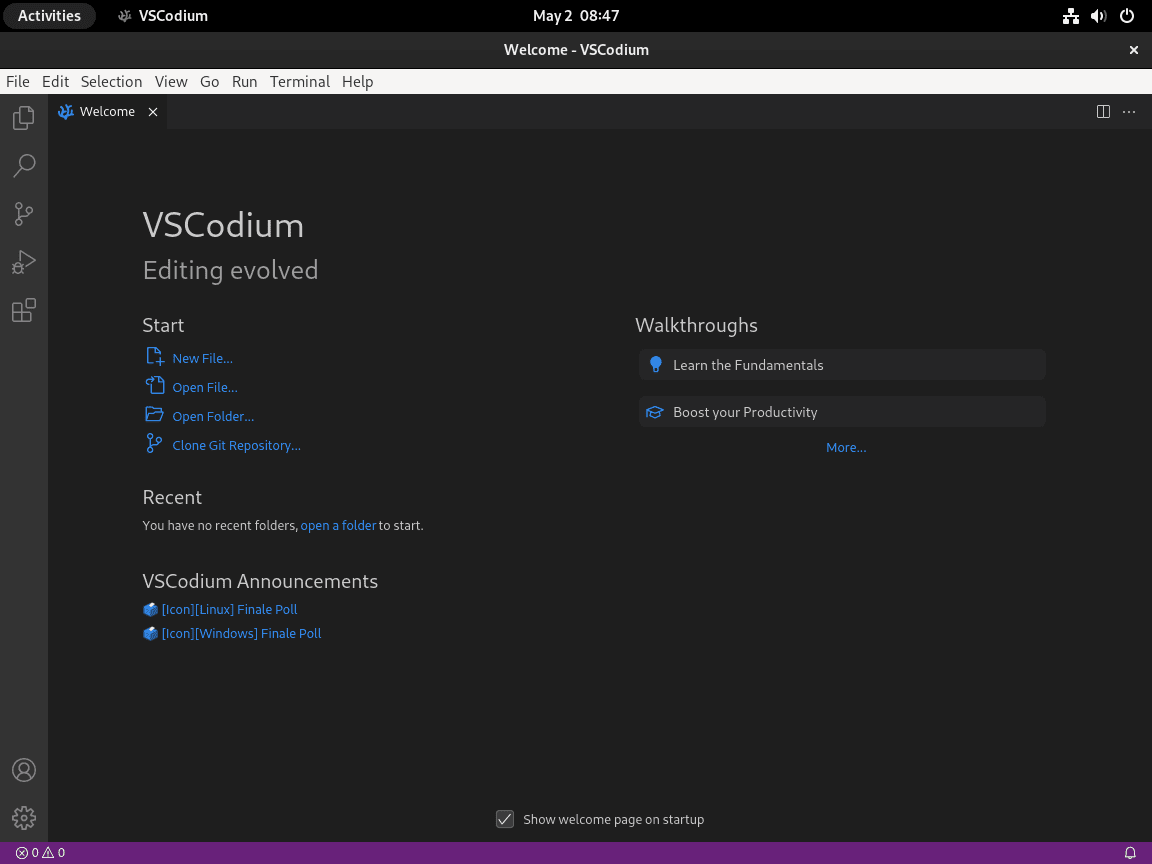
If you prefer the desktop launcher, search for VSCodium in Activities and open it from the application grid:
- Open Activities.
- Search for VSCodium.
- Select the VSCodium icon to launch the editor.
Update VSCodium on Fedora
Use the same package manager you installed VSCodium with. Mixing update paths is the easiest way to lose track of which build is actually in use.
Update the RPM installation
The RPM repository updates VSCodium through the normal Fedora upgrade workflow:
sudo dnf upgrade --refreshIf a newer build is available, DNF installs it alongside the rest of your package updates.
Update the Flatpak installation
Keep the Flatpak build at system scope if that is how you installed it:
sudo flatpak update --system com.vscodium.codiumWhen no newer Flatpak build is available, the command ends with Nothing to do.
Nothing to do.
Remove VSCodium from Fedora
Use the matching removal commands for the method you installed. Remove local data only after you have exported any settings, snippets, or extensions you want to keep.
Remove the RPM installation
Uninstall the native package first:
sudo dnf remove codiumIf you no longer need the upstream repository, remove the repo file and clear the old metadata cache:
sudo rm -f /etc/yum.repos.d/vscodium.repo
sudo dnf clean metadata
The next commands permanently delete VSCodium settings and extensions stored in your home directory. Back up anything you still need before you remove these paths.
rm -rf ~/.config/VSCodium
rm -rf ~/.vscode-oss
If you used remote development features, remove ~/.vscodium-server on each remote host separately.
Remove the Flatpak installation
Remove the Flatpak build with the same system-scope option used during installation:
sudo flatpak uninstall --system com.vscodium.codiumDeleting the Flatpak data directory removes local settings, cached data, and any state stored inside the VSCodium sandbox.
rm -rf ~/.var/app/com.vscodium.codiumTroubleshoot VSCodium on Fedora
These are the Fedora-specific failures most likely to interrupt the install on a current workstation.
Flatpak install fails with a system operation error
If you try the Flatpak install without matching the system-scope remote, Fedora can stop with an error like this:
error: Failed to install org.freedesktop.Sdk: Flatpak system operation Deploy not allowed for user
This usually happens when flathub is configured as a system remote but the install command is run without sudo. Check the system remotes first:
flatpak remotes --systemIf flathub appears in that list, rerun the install at system scope:
sudo flatpak install --system flathub com.vscodium.codium -yVerify the fix by listing the installed Flatpak package:
flatpak list --system | grep -i '^VSCodium'VSCodium com.vscodium.codium 1.109.51242 stable
DNF cannot find the codium package
When the RPM repository file is missing or malformed, DNF cannot resolve the package and stops with output like this:
Failed to resolve the transaction:
No match for argument: codium
You can try to add to command line:
  --skip-unavailable to skip unavailable packages
Start by checking whether Fedora can still see the VSCodium repository:
dnf repo list --all | grep -i vscodiumIf the command returns no output, recreate the repository file and refresh metadata:
sudo tee /etc/yum.repos.d/vscodium.repo > /dev/null << 'EOF'
[vscodium]
name=VSCodium
baseurl=https://paulcarroty.gitlab.io/vscodium-deb-rpm-repo/rpms/
enabled=1
gpgcheck=1
repo_gpgcheck=0
gpgkey=https://gitlab.com/paulcarroty/vscodium-deb-rpm-repo/raw/master/pub.gpg
metadata_expire=1h
EOF
sudo dnf clean metadata
Run the repository check again. Once it shows the enabled VSCodium repo, retry sudo dnf install codium.
Frequently Asked Questions
No. Fedora does not include VSCodium in the default repositories, so you install it from the upstream RPM repository or from Flathub.
Use the RPM repository if you want VSCodium updated through dnf with the rest of your system packages. Use Flatpak if you prefer a sandboxed desktop app and do not mind managing it through flatpak instead.
The RPM package uses codium. The Flatpak build uses flatpak run com.vscodium.codium.
Use sudo dnf remove codium for the RPM build or sudo flatpak uninstall --system com.vscodium.codium for the Flatpak build. Remove the leftover data directories only after you have backed up settings or extensions you still want to keep.
Conclusion
VSCodium is ready on Fedora through either the native RPM repository or a system-scope Flatpak install, with the update and cleanup commands in place when you need them. Add Git on Fedora for version control, enable SSH on Fedora for remote editing, or compare it with Visual Studio Code on Fedora if you still need Microsoft’s build.

Formatting tips for your comment
You can use basic HTML to format your comment. Useful tags currently allowed:
<code>command</code>command<strong>bold</strong><em>italic</em><blockquote>quote</blockquote>