
Transmission stays useful on Ubuntu because it handles the three BitTorrent workflows most people actually need: a GTK desktop client, a Qt desktop client, and small command-line tools for one-off downloads or torrent inspection. If you want to install Transmission on Ubuntu, the default repositories already package those pieces on Ubuntu 26.04, 24.04, and 22.04, while a Launchpad PPA and Flathub give older releases a newer desktop build.
That makes the main choice less about whether Ubuntu supports Transmission and more about which package source fits your release and desktop. Ubuntu’s own packages are the simplest path, the ubuntuhandbook1 PPA only matters on 24.04 and 22.04, and Flathub gives you a sandboxed desktop build that behaves the same across all three supported LTS releases.
Install Transmission on Ubuntu
Transmission is in Ubuntu’s default repositories as separate packages. Use transmission-gtk for the GNOME-friendly desktop client, transmission-qt for a Qt-style desktop frontend, and transmission-cli for terminal tools.
| Method | Channel | Version | Updates | Best For |
|---|---|---|---|---|
| Transmission GTK client | Ubuntu repositories | Distribution default | sudo apt install --only-upgrade transmission-gtk | GNOME and other GTK desktops |
| Transmission Qt client | Ubuntu repositories | Distribution default | sudo apt install --only-upgrade transmission-qt | KDE Plasma and other Qt desktops |
| Transmission CLI tools | Ubuntu repositories | Distribution default | sudo apt install --only-upgrade transmission-cli | Terminal-only torrent inspection and downloads |
| Transmission PPA | Launchpad PPA | Latest 4.1.1 build | sudo apt upgrade | Ubuntu 24.04 or 22.04 users who want Transmission 4.x through APT |
| Transmission from Flathub | Flathub | Latest stable | sudo flatpak update com.transmissionbt.Transmission -y | Sandboxed desktop install on any supported Ubuntu LTS |
Ubuntu 26.04 already ships Transmission 4.1.1 in the default repository. Ubuntu 24.04 ships 4.0.5, and Ubuntu 22.04 ships 3.00, which is why the PPA only adds real value on the older two LTS releases.
- Choose
transmission-gtkfor the standard GTK desktop client. - Choose
transmission-qtif you prefer a Qt or KDE-style interface. - Choose
transmission-cliwhen you only need terminal tools. - Choose the PPA on Ubuntu 24.04 or 22.04 if you want a newer Transmission 4.x package through APT.
- Choose Flathub when you want the same sandboxed desktop build on every supported Ubuntu LTS release.
Transmission installs from Ubuntu’s default repository on Ubuntu 26.04, 24.04, and 22.04.
The ubuntuhandbook1 PPA publishes packages for 24.04 and 22.04 only. Ubuntu 26.04 returns a Release-file error if you try to add it, so resolute users should stay with the default repository or Flathub.
Update Ubuntu Before Installing Transmission on Ubuntu
Refresh package metadata first so APT sees the current Ubuntu or PPA candidate cleanly.
sudo apt updateThese commands use
sudo. If your account does not have administrative access yet, follow the guide to add a new user to sudoers on Ubuntu before continuing.
Apply any pending upgrades before you install Transmission packages.
sudo apt upgradeTransmission ships in Ubuntu’s main archive on all three supported LTS releases, so you do not need to enable extra Ubuntu repository components before you install it.
Install the Transmission GTK Client on Ubuntu
The GTK build is the default choice for GNOME and other GTK-based desktops, and it shows up in the application menu as Transmission.
sudo apt install transmission-gtk -yThe -y flag accepts APT’s confirmation prompt automatically, which keeps the install command copy-ready.
Use APT metadata to confirm that the GTK package is installed and that the expected candidate is active for your Ubuntu release.
apt-cache policy transmission-gtkRelevant output on Ubuntu 26.04 includes:
transmission-gtk:
  Installed: 4.1.1+dfsg-1ubuntu1
  Candidate: 4.1.1+dfsg-1ubuntu1
  Version table:
 *** 4.1.1+dfsg-1ubuntu1 500
        500 http://au.archive.ubuntu.com/ubuntu resolute/main amd64 Packages
        100 /var/lib/dpkg/status
Ubuntu 24.04 shows 4.0.5-1build5, and Ubuntu 22.04 shows 3.00-2ubuntu2.1 in the same policy output.
Install the Transmission Qt Client on Ubuntu
The Qt build fits KDE Plasma and other Qt desktops better, and the launcher appears in the menu as Transmission (Qt).
sudo apt install transmission-qt -yCheck the installed package version with APT instead of relying on a GUI launcher to print a headless-safe version string.
apt-cache policy transmission-qtRelevant output on Ubuntu 26.04 includes:
transmission-qt:
  Installed: 4.1.1+dfsg-1ubuntu1
  Candidate: 4.1.1+dfsg-1ubuntu1
  Version table:
 *** 4.1.1+dfsg-1ubuntu1 500
        500 http://au.archive.ubuntu.com/ubuntu resolute/main amd64 Packages
        100 /var/lib/dpkg/status
Ubuntu 24.04 shows 4.0.5-1build5, and Ubuntu 22.04 shows 3.00-2ubuntu2.1 in the same policy output.
Install the Transmission CLI Tools on Ubuntu
The CLI package is useful when you want to inspect torrent metadata, pull a magnet link from a shell, or keep the workflow entirely in a terminal.
sudo apt install transmission-cli -yVerify that the CLI tools are installed by checking the version string from transmission-show.
transmission-show --versionExpected output on Ubuntu 26.04:
transmission-show 4.1.1 (56442e2929)
Ubuntu 24.04 prints transmission-show 4.0.5, and Ubuntu 22.04 prints transmission-show 3.00.
Add the Transmission PPA on Ubuntu 24.04 or 22.04
Use the ubuntuhandbook1 PPA only on Ubuntu 24.04 or 22.04. Ubuntu 26.04 already ships Transmission 4.1.1, and the PPA does not publish a resolute suite.
Minimal Ubuntu installs may need the repository helper package before add-apt-repository is available.
sudo apt install software-properties-common -yAdd the PPA with Ubuntu’s repository tool.
sudo add-apt-repository ppa:ubuntuhandbook1/transmission -yRefresh package metadata so APT can see the new candidate from Launchpad.
sudo apt updateRelevant output on Ubuntu 24.04 includes:
Hit:5 https://ppa.launchpadcontent.net/ubuntuhandbook1/transmission/ubuntu noble InRelease
On Ubuntu 22.04, the same line ends in jammy InRelease.
Install the GTK client from the PPA. If you want the Qt or CLI package instead, replace transmission-gtk with transmission-qt or transmission-cli.
sudo apt install transmission-gtk -yConfirm that the PPA candidate is the installed package version.
apt-cache policy transmission-gtkRelevant output on Ubuntu 24.04 includes:
transmission-gtk:
  Installed: 4.1.1-0build1~ubuntu24.04
  Candidate: 4.1.1-0build1~ubuntu24.04
  Version table:
 *** 4.1.1-0build1~ubuntu24.04 500
        500 https://ppa.launchpadcontent.net/ubuntuhandbook1/transmission/ubuntu noble/main amd64 Packages
        100 /var/lib/dpkg/status
Ubuntu 22.04 shows the same PPA version pattern with the suffix ~ubuntu22.04.
Install Transmission from Flathub on Ubuntu
Flathub makes sense when you want a sandboxed desktop build that stays consistent across Ubuntu 26.04, 24.04, and 22.04.
Flatpak is not pre-installed on Ubuntu. If you have not set it up yet, follow the guide to install Flatpak on Ubuntu before you add Flathub and install Transmission.
Add the Flathub remote at system scope so every local user can see the application.
sudo flatpak remote-add --if-not-exists flathub https://dl.flathub.org/repo/flathub.flatpakrepoVerify that Flathub is configured before you install the app.
flatpak remotesExpected output:
flathub system
Install Transmission from Flathub.
sudo flatpak install flathub com.transmissionbt.Transmission -yConfirm that Flatpak installed the expected app ID and version.
flatpak info com.transmissionbt.TransmissionRelevant output on Ubuntu 26.04 includes:
Transmission - Download and share files over BitTorrent

          ID: com.transmissionbt.Transmission
         Ref: app/com.transmissionbt.Transmission/x86_64/stable
        Arch: x86_64
      Branch: stable
     Version: 4.1.1
     License: GPL-2.0 OR GPL-3.0
      Origin: flathub
  Collection: org.flathub.Stable
Installation: system
Launch Transmission on Ubuntu
After installation, Ubuntu can launch Transmission from the application menu or from a terminal window in your current desktop session.
Launch Transmission from the Applications Menu on Ubuntu
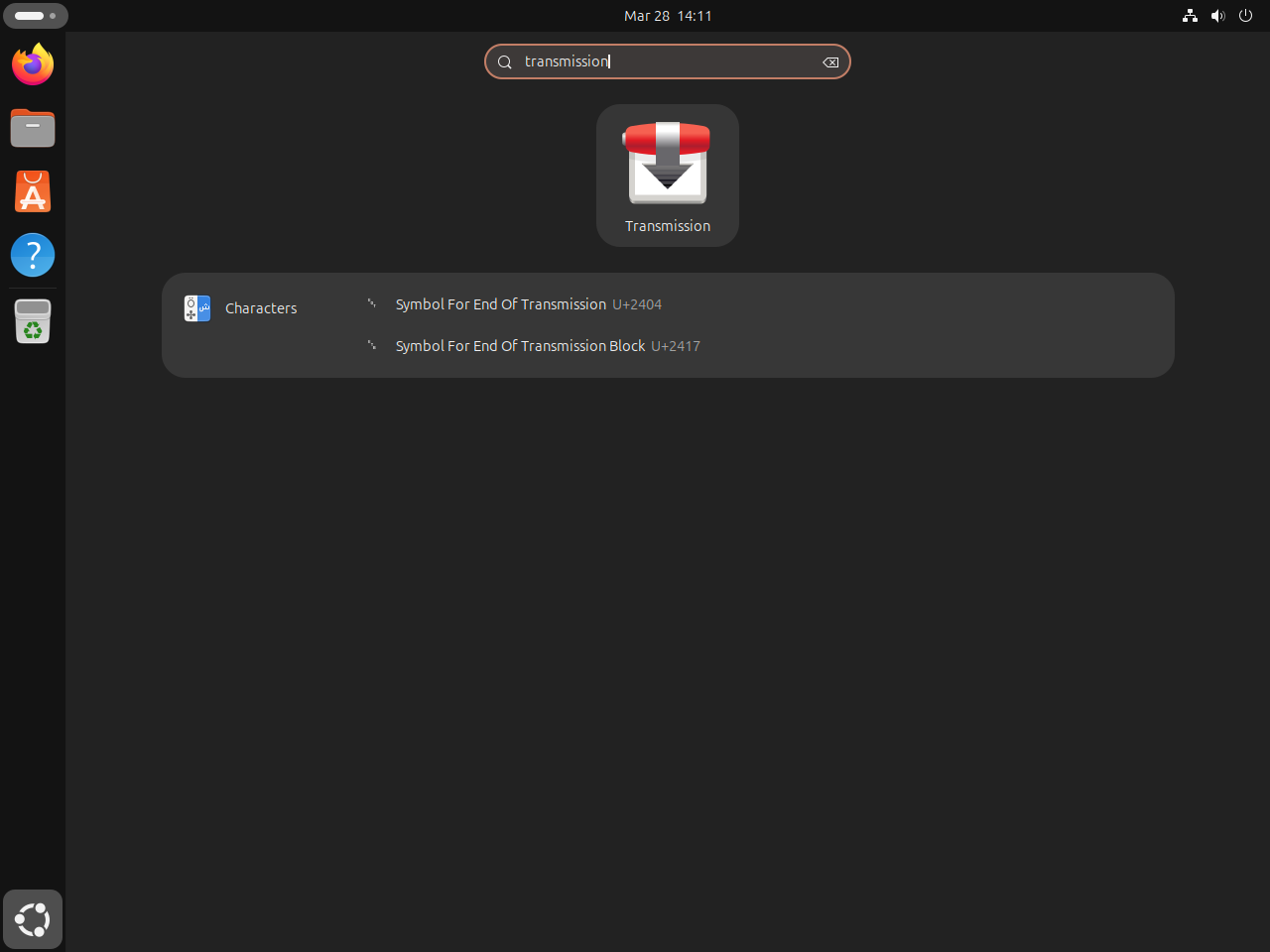
Search for Transmission if you installed the GTK package or the Flathub build. If you installed the Qt package, the launcher appears as Transmission (Qt).
Launch Transmission from the Terminal on Ubuntu
Use the command that matches the build you installed.
transmission-gtk &
transmission-qt &
flatpak run com.transmissionbt.Transmission &Adjust Transmission Preferences on Ubuntu
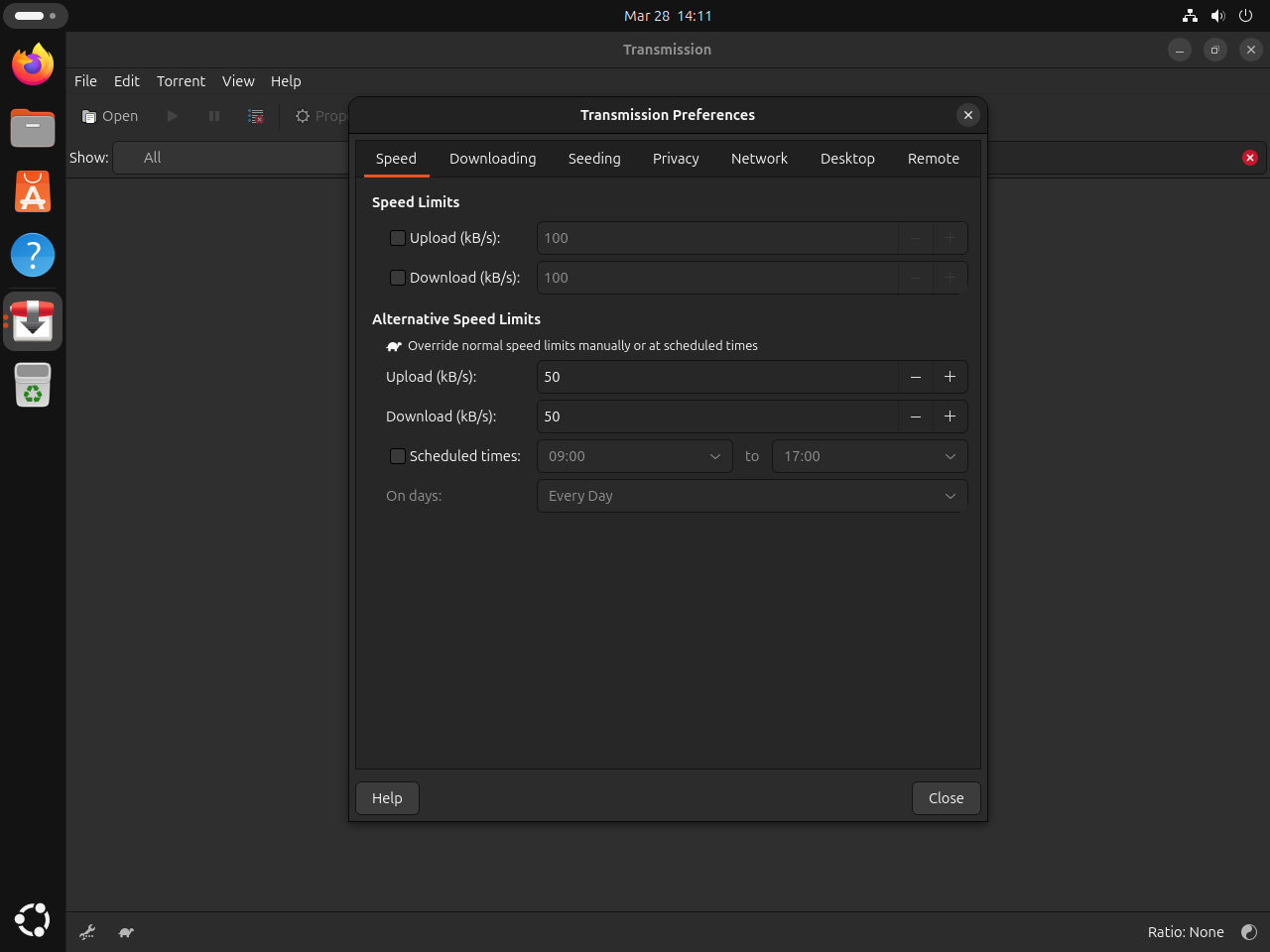
Most day-to-day setup lives under Edit > Preferences, where Transmission handles download locations, bandwidth rules, and its browser-accessible Web UI.
- Change the default download path under Edit > Preferences > Downloading if you do not want torrents landing in your home Downloads directory.
- Set upload and download caps under Edit > Preferences > Speed when Transmission should not consume your full line rate.
- Enable the built-in Web UI under Edit > Preferences > Remote if you want browser-based control, and review how to install and configure UFW on Ubuntu before you expose it beyond localhost or your trusted LAN.
Update Transmission on Ubuntu
APT-managed installs and the Flathub build update through their own package managers, so the command depends on which method you chose.
Update APT-installed Transmission on Ubuntu
Upgrade the exact Ubuntu or PPA package you installed instead of running a broader placeholder command.
sudo apt install --only-upgrade transmission-gtkReplace transmission-gtk with transmission-qt or transmission-cli if that is the package you chose earlier. PPA installs follow the same update path once the PPA is already configured.
Update Flathub Transmission on Ubuntu
Flatpak updates the sandboxed build independently of APT.
sudo flatpak update com.transmissionbt.Transmission -yRemove Transmission on Ubuntu
Remove the package or Flatpak app that matches your install method, then verify that the package manager no longer reports it as installed.
Remove APT-installed Transmission on Ubuntu
Remove the Ubuntu packages you installed. Adjust the list if you only used one frontend.
sudo apt remove transmission-gtk transmission-qt transmission-cliClean up orphaned dependencies after the main packages are gone.
sudo apt autoremoveUse APT policy output to confirm that the package is no longer installed.
apt-cache policy transmission-gtkRelevant output on Ubuntu 26.04 includes:
transmission-gtk:
  Installed: (none)
  Candidate: 4.1.1+dfsg-1ubuntu1
  Version table:
     4.1.1+dfsg-1ubuntu1 500
        500 http://au.archive.ubuntu.com/ubuntu resolute/main amd64 Packages
Remove the Transmission PPA on Ubuntu 24.04 or 22.04
Remove the PPA only if you added it earlier. If you want a deeper cleanup workflow, use the guide to remove a PPA from Ubuntu.
sudo add-apt-repository --remove -y ppa:ubuntuhandbook1/transmissionRefresh APT after removing the Launchpad source.
sudo apt updateCheck that the candidate has fallen back to Ubuntu’s archive version instead of the PPA build.
apt-cache policy transmission-gtkRelevant output on Ubuntu 24.04 includes:
transmission-gtk:
  Installed: (none)
  Candidate: 4.0.5-1build5
  Version table:
     4.0.5-1build5 500
        500 http://au.archive.ubuntu.com/ubuntu noble/main amd64 Packages
Remove Flathub Transmission on Ubuntu
Remove the Flatpak app and its sandbox data if you no longer want the Flathub build.
sudo flatpak remove --delete-data com.transmissionbt.Transmission -yConfirm that Flatpak no longer lists the app.
flatpak list --app | grep -F com.transmissionbt.Transmission || echo "not installed"Expected output:
not installed
Clean up unused runtimes afterward if you no longer need them.
sudo flatpak uninstall --unused -yTransmission on Ubuntu FAQ
Yes. Ubuntu 26.04, 24.04, and 22.04 all package Transmission in Ubuntu’s default repositories. The main desktop and terminal packages are transmission-gtk, transmission-qt, and transmission-cli, with newer default versions on newer Ubuntu releases.
No. Ubuntu 26.04 already ships Transmission 4.1.1 in the default repository, and the ubuntuhandbook1 PPA does not publish a resolute suite. On 26.04, use Ubuntu’s own packages or the Flathub build instead.
The plain transmission package is a metapackage that depends on one of the real frontends. If you want a predictable result, install transmission-gtk, transmission-qt, or transmission-cli directly instead of relying on the wrapper package.
Yes. The Snap Store currently offers a community-maintained package named transmission. The older transmission-community package name from older tutorials is gone, and Ubuntu’s native packages or the Flathub build are usually easier to maintain for this workflow.
Conclusion
Transmission is installed on Ubuntu with the package source that fits your release, whether that means Ubuntu’s own repository, the 24.04 and 22.04 PPA, or the Flathub build. If you want to compare another BitTorrent client with a stronger Web UI story, install qBittorrent on Ubuntu. If sandboxed desktop apps make more sense for your system, install Flatpak on Ubuntu for the broader app catalog.

Formatting tips for your comment
You can use basic HTML to format your comment. Useful tags currently allowed in published comments:
<code>command</code>command<strong>bold</strong><em>italic</em><blockquote>quote</blockquote>