

PCB layout gets harder once the schematic editor, footprint libraries, 3D viewer, and manufacturing exports all live in separate tools. KiCad keeps that workflow in one place, and you can install KiCad on Ubuntu with the stock Universe package, the KiCad 9 PPA, Flatpak, or Snap depending on how current you want the toolchain.
Ubuntu 26.04 already ships KiCad 9 in Universe, while Ubuntu 24.04 and 22.04 still need the KiCad team PPA or Flatpak if you want the current major release. The packages install cleanly from a terminal on desktop or minimal systems, but KiCad itself still needs a graphical session to launch.
Install KiCad on Ubuntu
The best KiCad method depends on your Ubuntu release and whether you want Ubuntu-managed packages or the same build on every supported LTS.
| Method | Ubuntu 26.04 | Ubuntu 24.04 | Ubuntu 22.04 | Best for |
|---|---|---|---|---|
| APT from the Ubuntu repository | KiCad 9.0.x | KiCad 7.0.x | KiCad 6.0.x | Ubuntu 26.04 users, or anyone who prefers Ubuntu-managed packages |
| KiCad 9 PPA | No advantage over the Ubuntu package | KiCad 9.0.x | KiCad 9.0.x | Ubuntu 24.04 and 22.04 users who want KiCad 9 through APT |
| Flatpak via Flathub | KiCad 9.0.x | KiCad 9.0.x | KiCad 9.0.x | Readers who want the same sandboxed build on every supported release |
| Snap | KiCad 9.0.x | KiCad 9.0.x | KiCad 9.0.x | Readers already committed to Snap’s update model |
- Use the Ubuntu repository on 26.04 if you want KiCad 9 with no extra repository setup.
- Use the KiCad 9 PPA on 24.04 or 22.04 if you want the current major release through APT.
- Use Flatpak when you want the same sandboxed KiCad build across Ubuntu 26.04, 24.04, and 22.04.
- Use Snap only if you already rely on snapd, because the current channel is still one point release behind the Ubuntu 26.04 package and Flathub build.
KiCad’s official Ubuntu download page points readers to distro-specific package sources instead of a standalone installer.
Ubuntu 26.04 already makes the KiCad 9 PPA optional because the default repository installs the same 9.0.x major release. On Ubuntu 24.04 and 22.04, the PPA raises KiCad from 7.0.x or 6.0.x to 9.0.x. Flatpak currently matches KiCad 9.0.8, while the Snap channel is still at 9.0.7.
Update Ubuntu Before Installing KiCad
Refresh package metadata and apply any pending upgrades before you start.
sudo apt update && sudo apt upgradeThese commands use
sudofor package-management tasks. If your account does not have sudo access yet, follow the guide to add a new user to sudoers on Ubuntu before continuing.
Install KiCad from the Ubuntu Repository
Use the Ubuntu package if you want the distro-managed build. KiCad lives in the Universe component, so standard desktop installs usually work immediately, while minimal or custom images may need you to enable Universe on Ubuntu first.
sudo apt install kicadConfirm the installed version with APT after the package finishes installing.
apt-cache policy kicadExample output on Ubuntu 26.04:
kicad:
  Installed: 9.0.8+dfsg-1
  Candidate: 9.0.8+dfsg-1
  Version table:
 *** 9.0.8+dfsg-1 500
        500 http://au.archive.ubuntu.com/ubuntu resolute/universe amd64 Packages
        100 /var/lib/dpkg/status
On Ubuntu 24.04, the same command installs KiCad 7.0.x, and on Ubuntu 22.04 it installs KiCad 6.0.x. If you want KiCad 9 on those releases without switching to Flatpak, use the PPA method next.
Install KiCad 9 via the KiCad PPA on Ubuntu
The KiCad 9 PPA is the best APT-based choice on Ubuntu 24.04 and 22.04. Ubuntu 26.04 already ships KiCad 9 from Universe, so the PPA does not improve the package candidate there.
If Ubuntu cannot find add-apt-repository on a minimal install, install the helper package first.
sudo apt install software-properties-commonAfter that, add the KiCad 9 PPA directly:
sudo add-apt-repository ppa:kicad/kicad-9.0-releases -yRefresh APT so Ubuntu reads the new PPA metadata.
sudo apt updateYou should see Ubuntu fetch the KiCad PPA during the update:
Hit:5 https://ppa.launchpadcontent.net/kicad/kicad-9.0-releases/ubuntu noble InRelease
Install KiCad from the new candidate, then confirm APT selected the PPA build.
sudo apt install kicadapt-cache policy kicadExample output on Ubuntu 24.04 after upgrading through the PPA:
kicad:
  Installed: 9.0.8~ubuntu24.04.1
  Candidate: 9.0.8~ubuntu24.04.1
  Version table:
 *** 9.0.8~ubuntu24.04.1 500
        500 https://ppa.launchpadcontent.net/kicad/kicad-9.0-releases/ubuntu noble/main amd64 Packages
        100 /var/lib/dpkg/status
     7.0.11+dfsg-1build4 500
        500 http://au.archive.ubuntu.com/ubuntu noble/universe amd64 Packages
On Ubuntu 22.04, the same PPA raises KiCad from 6.0.x to 9.0.x and adds the newer kicad-cli companion binary that the stock Jammy package does not ship.
Install KiCad via Flatpak on Ubuntu
Flatpak gives you the same KiCad build across Ubuntu 26.04, 24.04, and 22.04 without touching APT. It is the cleanest cross-release option if you want a sandboxed desktop app.
Flatpak is not pre-installed on Ubuntu. If you have not set it up yet, install it with
sudo apt install flatpakand restart your session before continuing. For the full setup, follow the guide to install Flatpak on Ubuntu.
Add Flathub if it is not already configured at system scope.
sudo flatpak remote-add --if-not-exists flathub https://dl.flathub.org/repo/flathub.flatpakrepoVerify the remote before you install KiCad from it.
flatpak remotes --columns=name,optionsflathub system
The first Flatpak install is large because Flathub pulls the Freedesktop SDK plus KiCad’s libraries and 3D packages.
sudo flatpak install flathub org.kicad.KiCad -yCheck the installed version and scope with flatpak info.
flatpak info org.kicad.KiCadKiCad - An EDA suite for schematic and circuit board design
ID: org.kicad.KiCad
Ref: app/org.kicad.KiCad/x86_64/stable
Arch: x86_64
Branch: stable
Version: 9.0.8
Origin: flathub
Installation: system
Install KiCad via Snap on Ubuntu
The Snap package installs on all supported Ubuntu releases with one command, but it currently trails the Ubuntu 26.04 repository and Flathub by one point release. Keep it as an optional path if you already prefer snapd’s update model.
sudo snap install kicadVerify the installed channel and revision with Snap itself.
snap list kicadName Version Rev Tracking Publisher Notes kicad 9.0.7 22 latest/stable sethh -
Launch KiCad on Ubuntu
KiCad starts from the application grid or from a terminal, but every package format still opens the same desktop application. If you installed it over SSH or on a minimal system, switch to a graphical session before launching it.
Launch KiCad from the Application Menu
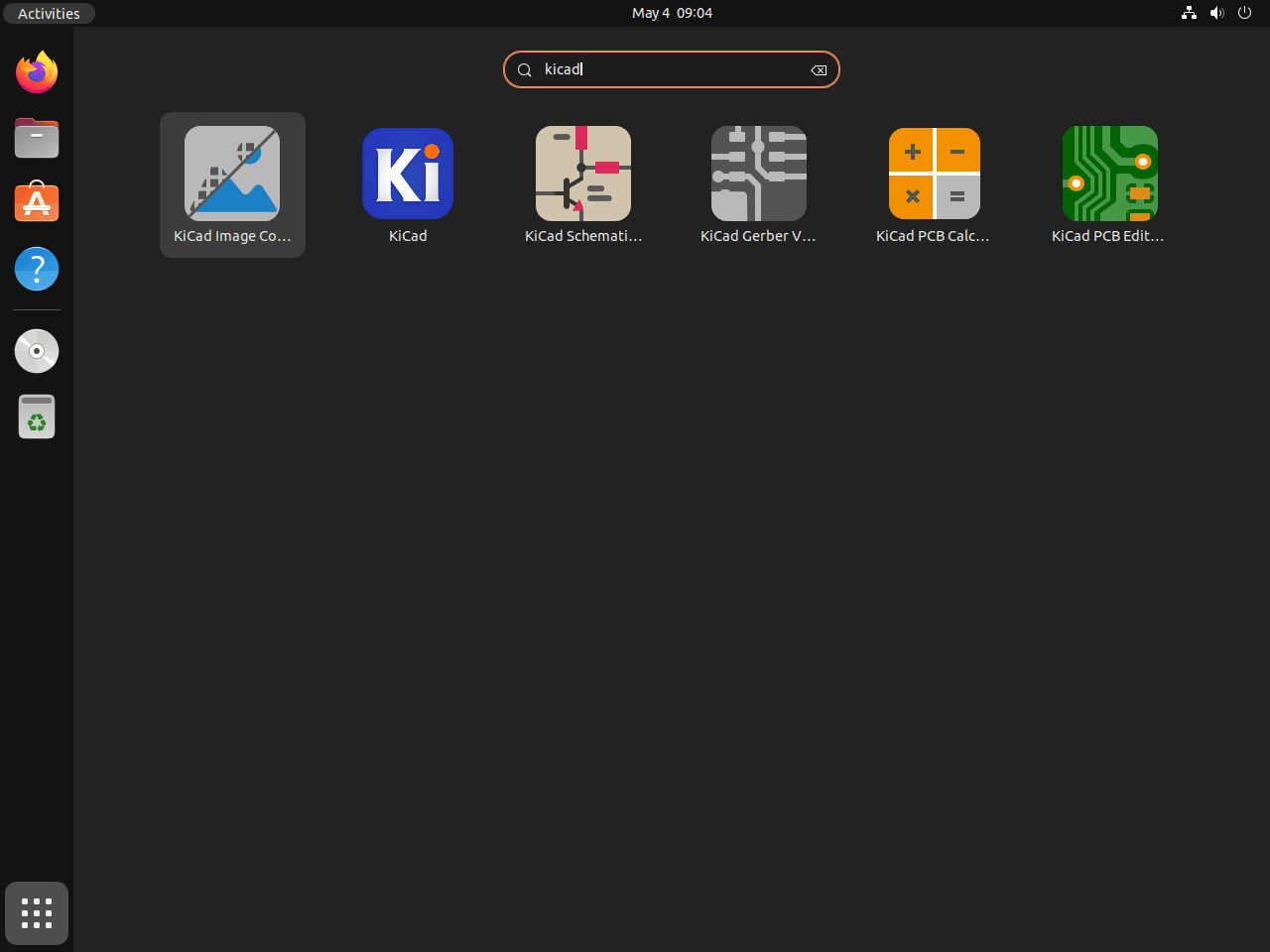
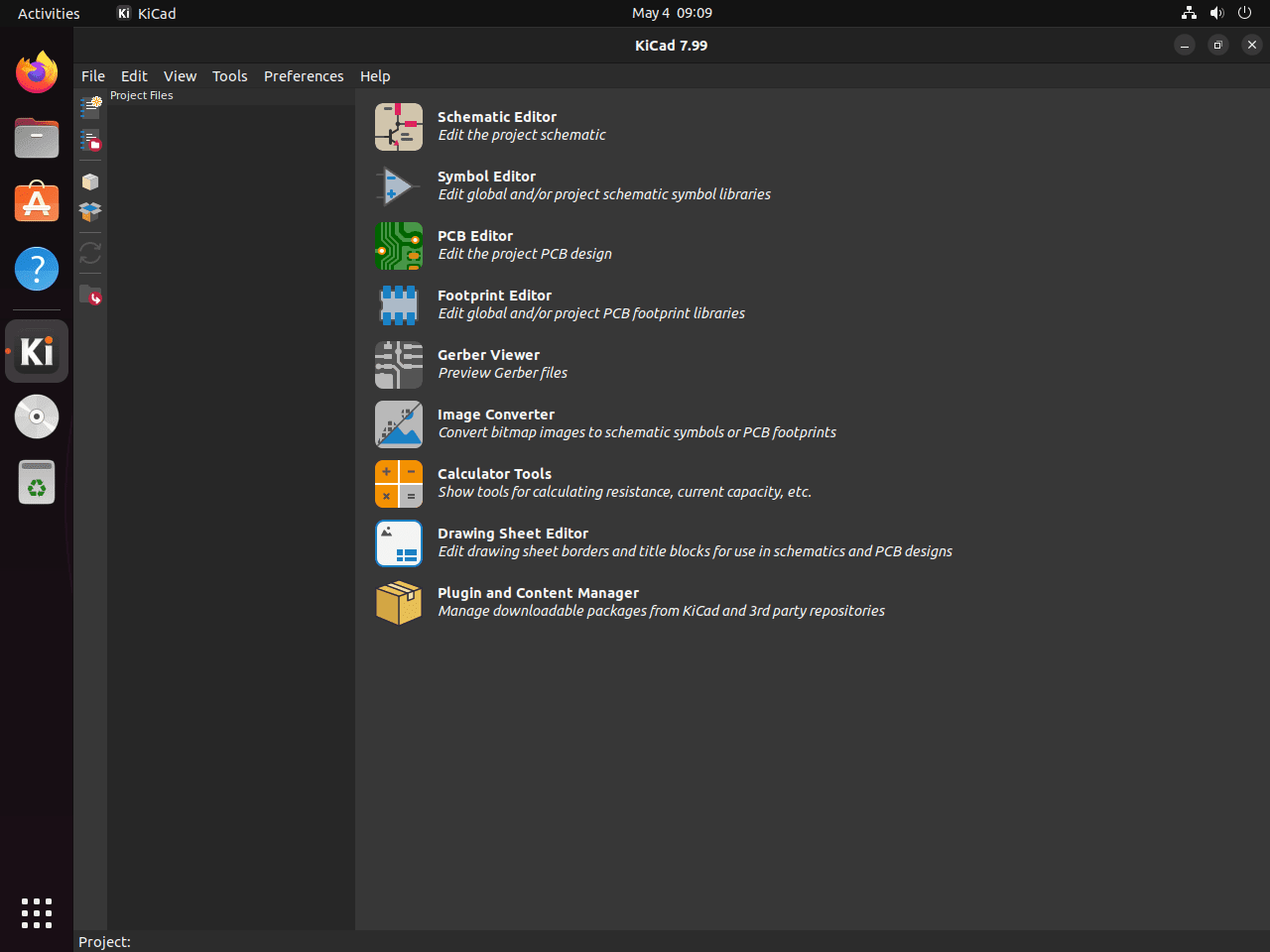
Ubuntu’s application grid is the easiest launch path for most desktop users.
- Open Activities in the top-left corner of the desktop.
- Type KiCad into the search field.
- Open the KiCad project manager from the result list.
Launch KiCad from the Terminal
Use the launcher that matches the package format you installed.
APT or PPA installation:
kicadFlatpak installation:
flatpak run org.kicad.KiCadSnap installation:
snap run kicadIf your board work also needs 2D drafting or enclosure design, see Install LibreCAD on Ubuntu and Install FreeCAD on Ubuntu. For firmware work that follows the schematic and PCB stages, Install Arduino on Ubuntu covers the IDE side.
Manage KiCad on Ubuntu
Update KiCad on Ubuntu
Use the updater that matches the package source you chose.
Ubuntu repository or KiCad 9 PPA:
sudo apt update
sudo apt install --only-upgrade kicad
Flatpak:
sudo flatpak update org.kicad.KiCad -ySnap:
sudo snap refresh kicadRemove KiCad from APT or the KiCad PPA
KiCad’s current Ubuntu package does not ship package-managed conffiles, so a normal remove is enough for the APT and PPA installs.
sudo apt remove --autoremove kicadVerify the package is gone before you clean up any extra repository you added.
dpkg -l kicad | grep '^ii' || echo "kicad is not installed"kicad is not installed
If you added the KiCad 9 PPA on Ubuntu 24.04 or 22.04, remove that source afterward so Ubuntu falls back to the stock repository.
sudo add-apt-repository --remove ppa:kicad/kicad-9.0-releases -y
sudo apt update
On Ubuntu 24.04, apt-cache policy should return to the Ubuntu repository candidate after the PPA is removed.
apt-cache policy kicadkicad:
Installed: (none)
Candidate: 7.0.11+dfsg-1build4
Version table:
9.0.8~ubuntu24.04.1 -1
100 /var/lib/dpkg/status
7.0.11+dfsg-1build4 500
500 http://au.archive.ubuntu.com/ubuntu noble/universe amd64 Packages
The negative-priority /var/lib/dpkg/status line for the removed PPA build is normal. The important part is that Candidate now points back to Ubuntu’s repository package. Ubuntu 22.04 shows the same pattern, but the candidate returns to its older 6.0.x package instead of 7.0.x.
Remove the KiCad Flatpak
Remove the Flatpak package first, then clean up any unused runtimes left behind.
sudo flatpak remove org.kicad.KiCad -y
sudo flatpak uninstall --unused -y
Confirm the app ID is gone from the installed application list.
flatpak list --app | grep -F org.kicad.KiCad || echo "org.kicad.KiCad not installed"org.kicad.KiCad not installed
Remove the KiCad Snap
Remove the snap package with snapd’s normal cleanup command.
sudo snap remove kicadSnap saves an automatic snapshot when you remove the package. List saved snapshots if you also want to clear that backup.
sudo snap savedSet Snap Age Version Rev Size Notes 1 kicad 10.3s 9.0.7 22 92.3kB auto
If you do not want to keep that snapshot, forget it by ID.
sudo snap forget <ID>Verify the snap itself is gone.
snap list kicad 2>/dev/null || echo "kicad not installed"kicad not installed
Find KiCad User Data Before Deleting It
The next check is only for readers who want a full reset of local settings, custom libraries, and launcher state. Back up any personal symbols, footprints, templates, or project files before you delete anything from your home directory.
KiCad’s per-user data only appears after the application has been launched, and the exact path depends on the package format. Check what exists on your own system before you remove it.
find "$HOME" -maxdepth 4 \( \
  -path "$HOME/.config/kicad" -o \
  -path "$HOME/.local/share/kicad" -o \
  -path "$HOME/.cache/kicad" -o \
  -path "$HOME/.var/app/org.kicad.KiCad" -o \
  -path "$HOME/snap/kicad" \
\) -print
The command only lists directories that already exist. If it prints nothing, KiCad has not created any of those paths yet and there is nothing to clean up in your home directory.
Only run the example that matches the paths from your own output. The rm -rf command removes directories recursively without prompting, so double-check the path before you press Enter.
If the command prints the native APT or PPA paths, remove those user settings and caches with:
rm -rf "$HOME/.config/kicad" "$HOME/.local/share/kicad" "$HOME/.cache/kicad"This removes KiCad’s native desktop configuration, library metadata, and cache files from your account. It does not remove the system package itself.
If the command prints the Flatpak path, remove that sandboxed data directory with:
rm -rf "$HOME/.var/app/org.kicad.KiCad"This clears the Flatpak-specific KiCad settings and data stored under your home directory.
If the command prints the Snap path, remove the Snap-specific user data with:
rm -rf "$HOME/snap/kicad"This deletes the per-user Snap data directory for KiCad. If you want a complete reset, remove the package first, clear any saved Snap snapshot, and then delete this directory only if it still exists.
KiCad on Ubuntu FAQ
No. Ubuntu 26.04 already ships KiCad 9.0.x from the Universe repository, and ppa:kicad/kicad-9.0-releases does not currently beat that package’s candidate version.
Use the ppa:kicad/kicad-9.0-releases PPA or the Flatpak build from Flathub. Ubuntu’s default repository still gives KiCad 7.0.x on 24.04 and 6.0.x on 22.04.
KiCad’s Linux download page points Ubuntu users to distro packaging instead of a standalone Ubuntu .deb. On Ubuntu, the maintained paths are the stock repository, the KiCad 9 PPA, Flatpak, or Snap.
Yes. The packages install fine from a terminal, but KiCad is still a desktop EDA suite and needs a graphical session before kicad can open the project manager, schematic editor, or PCB tools. If apt cannot find the package, enable the universe component first.
Conclusion
KiCad is installed on Ubuntu, and the best package source now depends mostly on your release: Ubuntu 26.04 already ships KiCad 9, while Ubuntu 24.04 and 22.04 still benefit from the KiCad 9 PPA or Flatpak when you want the current major release. If your workflow extends into enclosure design or firmware work, pair it with Install FreeCAD on Ubuntu and Install Arduino on Ubuntu.

Formatting tips for your comment
You can use basic HTML to format your comment. Useful tags currently allowed in published comments:
<code>command</code>command<strong>bold</strong><em>italic</em><blockquote>quote</blockquote>